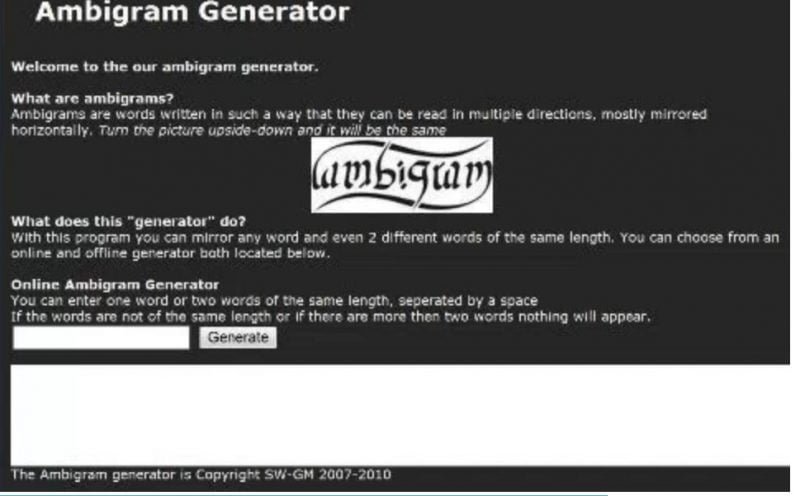
The world of typography holds countless wonders, but few are as captivating as the ambigram. Imagine a word or phrase that not only holds deep personal meaning but also transforms visually, revealing itself anew when rotated, flipped, or even seen from a different perspective. It's a clever, often stunning, piece of art that can feel almost magical. If you've ever marveled at these designs and wondered how to create one yourself, you're in the right place. This guide is your definitive, step-by-step roadmap to using an ambigram generator effectively, turning your creative visions into tangible, symmetrical masterpieces.
Whether you're looking to craft a unique tattoo, a memorable logo, or just play with the artistry of words, leveraging an ambigram generator simplifies what was once a complex, manual design process. We'll walk you through the entire journey, from understanding the nuances of ambigram types to harnessing the power of specialized tools and refining your final design.
At a Glance: Your Quick Guide to Ambigram Generators
- What is an Ambigram? A word or phrase designed to be read in multiple orientations (e.g., upside-down, reflected).
- Why Use a Generator? It offers speed, advanced algorithms, customization options, and inspiration for complex designs far beyond what most free letter flippers can achieve.
- Choosing Your Tool: Understand the difference between basic free tools and advanced, often paid, generators that prioritize legibility and design quality.
- Key Steps: Select ambigram type, set design preferences, input your text, generate designs, then customize and download.
- Practical Uses: Perfect for tattoos, unique logos, personalized gifts, artistic projects, and social media content.
- Pro Tip: Always test readability across all intended perspectives and don't shy away from experimenting with styles.
The Enigma of the Ambigram: A Brief Unveiling
Before we dive into the "how-to," let's ensure we're all on the same page about what an ambigram truly is. At its heart, an ambigram is a typographical design where a word, name, or phrase holds its original meaning or form even when viewed from a different perspective. This isn't just about mirrored letters; it's a sophisticated interplay of form and function that results in a visually stunning and intellectually engaging design.
Think of it as a typographic illusion, where a carefully crafted sequence of letters appears legible not just in one orientation, but in several. This makes them inherently fascinating, perfect for designs that aim to be thought-provoking and distinctive.
Decoding the Different Faces of Ambigrams
While the core concept remains consistent, ambigrams manifest in various forms, each with its own unique charm and design challenge. Understanding these types will help you choose the right approach for your project when using a generator.
- Rotational Ambigrams: These are arguably the most popular and instantly recognizable type. A rotational ambigram reads the same (or forms a different word/phrase) when rotated 180 degrees. They are incredibly popular for tattoos, brand logos, and artistic expressions due to their inherent symmetry and elegant transformation. Imagine "SWIM" reading as "SWIM" when upside-down – that's the magic of a rotational design.
- Mirror Ambigrams: As the name suggests, these ambigrams are designed to read the same when reflected horizontally or vertically. While less common than rotational designs, they offer a distinct visual appeal, often playing with the natural symmetry found in certain letters. Think of a word that looks identical when viewed in a mirror.
- Perceptual Shift Ambigrams: These are a bit more complex and mind-bending. A perceptual shift ambigram reveals a different word or phrase when viewed from another angle or perspective. The letters morph and reshape in your mind's eye. For example, a design might read "LOVE" right-side up, but subtly transform into "HATE" when rotated 180 degrees. This type requires immense design skill, often making generator tools invaluable.
- Complex Multi-Word Ambigrams: Taking complexity to another level, these designs combine multiple words into a single, cohesive visual. This could involve an ambigram where "Mark" and "Laurie" are interwoven, or where "Forever" and "Friends" become one fluid design, readable from different orientations. These are particularly powerful for personal tributes, commemorative items, or brand stories.
Why Turn to an Ambigram Generator? Unlocking Speed, Precision, and Creativity
Manually designing a high-quality ambigram requires significant artistic skill, a deep understanding of typography, and an incredible amount of patience. It’s a craft that can take years to master. For most of us, that's simply not feasible, especially when we have a specific vision in mind for a tattoo, a logo, or a personalized gift. This is precisely where ambigram generators shine.
These specialized digital tools, often powered by sophisticated algorithms or even AI, democratize ambigram creation. They allow anyone, regardless of their design background, to instantly produce intricate and compelling ambigram designs.
The Undeniable Benefits of Using a Generator
- Unmatched Speed & Efficiency: Imagine spending hours, even days, sketching and refining letterforms to ensure perfect symmetry and readability. An ambigram generator slashes this time down to seconds. You input your text, select your preferences, and voilà—multiple designs are generated almost instantly. This rapid iteration allows for far more experimentation than manual methods.
- Precision & Legibility: The algorithms behind quality generators are designed to handle complex typographical challenges. They understand how letters interact, ensuring that the final design is not just visually appealing but, critically, perfectly legible from all intended perspectives. This avoids the awkward letter pairings and readability issues common with less sophisticated "letter flipper" scripts.
- Customization at Your Fingertips: Good generators offer a wealth of customization options. You're not stuck with a one-size-fits-all output. You can often adjust font styles (from Gothic to modern minimalist), experiment with colors, tweak spacing, and even define the complexity level of the design. This control ensures the ambigram truly reflects your personal aesthetic or brand identity.
- Versatility for Every Application: From the deeply personal to the professionally branded, ambigram generators produce designs suitable for a vast array of uses. Whether it’s a tattoo, a distinctive business logo, a personalized wedding gift, or an eye-catching social media graphic, the generator provides the foundational artwork.
- A Wellspring of Inspiration: Sometimes, the hardest part is getting started. Generators can provide a fantastic starting point, offering a variety of design suggestions that might spark new creative ideas you hadn't considered. It’s like having a team of typographers brainstorming for you, giving you diverse options to refine.
While some basic tools might let you generate ambigrams for free, often these are simple letter flippers that don't consider the intricate connections and aesthetic balance needed for a truly compelling ambigram. For higher quality and more advanced features, investing in a specialized generator can make all the difference.
Your Step-by-Step Playbook: How to Use an Ambigram Generator Effectively
Ready to dive in and create your own typographic masterpiece? Here's a practical, step-by-step guide to navigating an ambigram generator and achieving the best possible results.
Step 1: Choosing Your Canvas – Selecting the Ambigram Type
The very first decision you'll make is what kind of ambigram you want to create. As we discussed, generators can often handle various types, though rotational is the most common.
- Rotational (180°): This is ideal for most personal projects, tattoos, and logos where a single word or phrase needs to read the same upside-down. This is typically the default setting for most generators.
- Mirror: If you want a design that reads the same when reflected, look for this option. It's less common but offers a distinct aesthetic.
- Perceptual Shift: For the truly ambitious, if you want one word to transform into another when rotated, select this option. Note that not all free or basic generators support this advanced functionality; it's often a feature of premium tools.
- Complex Multi-Word: If you're intertwining two different words or names into a single design (e.g., "Mark / Laurie"), choose the multi-word option. Again, this is a more advanced feature usually found in sophisticated generators.
Pro-Tip: If this is your first time, start with a rotational ambigram of a single word. It’s the easiest to master and still incredibly impactful.
Step 2: Setting the Stage – Design Preferences & Intent
Once you've selected your ambigram type, it's time to inform the generator about your aesthetic preferences and the intended application. This helps the tool tailor its output to your specific needs.
- Font Style: Most generators offer a range of font styles. Do you want something elegant and flowing (Gothic, script)? Modern and clean (sans-serif)? Bold and impactful? Consider your personal taste and where the ambigram will be used. A tattoo might call for a different font than a corporate logo.
- Intended Application: Some generators ask about the end-use (e.g., tattoo, logo, print, digital). This isn't always a direct setting, but it helps guide your font and style choices. For instance, a tattoo requires clear, readable lines that will translate well onto skin, while a digital graphic might allow for more intricate details.
- Complexity Level: If available, this setting allows you to choose how intricate the letter connections and overall design should be. A lower complexity might yield simpler, clearer designs, while higher complexity could result in more artistic, interwoven letterforms.
- Colors & Backgrounds: For digital outputs, you might have options to select foreground and background colors. This is typically for presentation purposes, as the core ambigram design is usually monochrome.
Step 3: Bringing Your Words to Life – The Generation Process
This is where the magic happens! With your preferences set, it's time to input your text.
- Enter Your Text: In the designated input field, type the word(s) or phrase you wish to ambigrammatize.
- For single-word rotational ambigrams: Simply type the word (e.g., "Harmony").
- For multi-word rotational/perceptual shift ambigrams: If you want "Mark" to transform into "Laurie," you'll usually enter them separated by a slash or specific input fields (e.g., "Mark / Laurie"). Pay attention to the generator's specific instructions for inputting dual words.
- Initiate Generation: Click the "Generate," "Create," "Design," or similar button. The generator's algorithms will then get to work, processing your input and preferences.
- Review the Previews: In a matter of seconds, the generator will present you with one or more ambigram designs. Take your time to review these initial previews.
- Readability Check: The most crucial step here is to ensure the ambigram is perfectly readable in all its intended orientations. If it's a rotational ambigram, mentally (or physically) rotate your screen or printout to check its legibility upside down.
- Aesthetic Appeal: Does it look good? Are the letterforms balanced? Does it convey the feeling you want?
Step 4: Polishing Your Masterpiece – Customization & Download
Rarely is the first generated design absolutely perfect. Most quality generators offer tools to refine your ambigram.
- Refine Elements:
- Font Variations: Experiment with different fonts suggested by the generator. Sometimes a subtle font change can dramatically improve readability or aesthetics.
- Stylistic Tweaks: Look for options to adjust line thickness, spacing between letters, or even minor stylistic embellishments.
- Layout Adjustments: Some tools might allow you to adjust the overall layout or grouping of elements, especially for multi-word ambigrams.
- Finalizing Your Design: Once you're satisfied with the design, look for the download options.
- Image Formats: You'll typically be offered various image formats like JPG, PNG (for transparent backgrounds), or SVG (scalable vector graphics, ideal for logos and high-resolution printing).
- For Premium Generators (e.g., FlipScript): Access to their high-quality ambigrams often requires ordering an "Ambigram Artwork Bundle." This usually includes a robust package: a multi-page PDF eBook with infinite resolution, showcasing your design in various formats (stencil, heart, circle, negative white-space, and even infinity symbol variations). These comprehensive bundles ensure you have versatile files for any application.
Remember, the goal is not just a generated image, but a perfectly legible, aesthetically pleasing ambigram that serves its purpose. Don't rush this customization phase.
The Quality Divide: Why Not All Generators Are Created Equal (Spotlight on FlipScript)
As you explore ambigram generators, you'll quickly discover a spectrum of quality. On one end, you have basic, often free ambigram generators that function as simple letter flippers, mapping individual letters to their rotated counterparts without much consideration for design flow or legibility. While these can be fun for a quick novelty, they often result in awkward, unbalanced, or outright unreadable designs.
On the other end of the spectrum are sophisticated tools like the FlipScript Ambigram Generator. This platform exemplifies what a high-quality generator can achieve, setting itself apart through patented algorithms and a focus on design integrity.
What Makes FlipScript Stand Out?
- Patented Algorithms for Superior Quality: Unlike basic tools that merely rotate or reflect letters individually, FlipScript's core strength lies in its patented algorithms. These algorithms understand how letters interact and connect typographically. They don't just flip letters; they intelligently combine them to create fluid, legible, and balanced ambigrams, avoiding the jarring transitions common in lesser generators. This results in designs that look professionally crafted, not just assembled.
- Prioritizing Legibility and Balance: The primary goal of FlipScript is to produce ambigrams that are easy to read from all intended orientations. This commitment to legibility ensures that your ambigram isn't just a clever trick, but a genuinely beautiful and understandable piece of typography. The balance in letterform and negative space is meticulously managed by their system.
- Handling Complex Multi-Word Designs: One of FlipScript's most impressive features is its ability to specify different words or names for each orientation, even when they have varying letter counts. For example, creating a design where "Mark" transforms into "Laurie" (a seven-letter word vs. a five-letter word) is a complex challenge that most free sites simply cannot address effectively. FlipScript's technology tackles these intricate pairings with remarkable success.
- Comprehensive Artwork Bundles: While FlipScript ambigrams are not free, the investment reflects the quality and depth of the output. When you order an "Ambigram Artwork Bundle," you receive much more than a simple image file. You get a multi-page PDF eBook with infinite resolution, perfect for scaling to any size without pixelation. This bundle also typically includes your ambigram presented in various useful formats:
- Stencil format: Ideal for tattoo artists or crafting.
- Heart and circle formats: Perfect for personalized gifts or emblems.
- Negative white-space designs: Offering a unique artistic interpretation.
- Infinity symbol integration: Blending your ambigram into a symbolic shape.
This level of detail and versatility makes premium generators like FlipScript invaluable for serious applications where quality and professional presentation are paramount. The choice between a free tool and a paid, high-quality generator often boils down to the intended impact and longevity of your ambigram design.
Beyond the Screen: Practical Applications of Your Ambigram
Once you've successfully generated and refined your ambigram, the possibilities for its application are vast and exciting. These designs aren't just fascinating digital images; they have powerful real-world utility across personal, artistic, and commercial spheres.
1. Personal Tattoos: Ink That Tells a Deeper Story
This is perhaps the most popular application for ambigrams. A name, a significant date, or a meaningful phrase transformed into an ambigram becomes an incredibly unique and personal tattoo. Imagine "Forever / Friends" or "Love / Family" etched onto your skin, revealing its dual meaning only upon a closer, rotated look. The inherent cleverness and symmetry of ambigrams make them ideal for permanent body art that consistently sparks conversation.
2. Logos & Branding: A Mark of Innovation
For businesses, an ambigram logo can be a powerful statement, conveying innovation, versatility, and a unique perspective. A brand mark that reads the same upside-down or transforms into a different, related word subtly communicates cleverness and adaptability. It creates an unforgettable impression and can differentiate a company in a crowded market. Think about how such a logo could suggest a brand's multifaceted nature or its commitment to viewing challenges from all angles.
3. Personalized Products & Gifts: Thoughtful and Unique
Ambigrams elevate any personalized item. They are perfect for:
- Wedding Invitations & Favors: Integrating the couple's names.
- Birthday & Holiday Gifts: Custom t-shirts, mugs, phone cases, or engraved jewelry featuring a loved one's name.
- Commemorative Items: A unique way to honor anniversaries or significant events.
The intricate design instantly makes an ordinary product extraordinary, turning it into a cherished keepsake.
4. Artistic Projects: Enhancing Visuals with Typographic Art
Artists and designers can leverage ambigrams to add an extra layer of intrigue to their work.
- Posters & Apparel: Creating eye-catching headlines or graphic elements.
- Album Covers: As seen on Lil Wayne's "Funeral" album, ambigrams can add depth and a conceptual twist to music packaging.
- Digital Graphics & Animations: Perfect for social media posts, website elements, or motion graphics where the transformation can be literally animated.
5. Social Media & Digital Art: Engaging and Shareable Content
In the age of visual content, an ambigram is a natural fit for social media. Its "wow" factor encourages shares, comments, and engagement. Posting an ambigram and inviting followers to discover its hidden meaning or transformation is a fun, interactive way to connect with your audience.
6. Unique Installations & Unexpected Uses: Beyond the Canvas
Ambigrams aren't confined to two dimensions or digital screens. Their structural nature allows for truly unique installations:
- Public Art: Sculptures or murals that reveal different words depending on the viewer's approach.
- Architectural Elements: Designs integrated into buildings, flooring, or railings.
- Tombstones: In a poignant and unique example, an ambigram featuring family names ("Tripp, Scott, Amy & Laura") was carved into a Kentucky tombstone, a testament to the enduring bond of family, readable from any direction.
- Television & Entertainment: Their inherent mystery and cleverness have even landed them on TV shows like "The Carbonaro Effect," captivating audiences with their impossible transformations.
The practical applications are only limited by imagination. An effectively used ambigram adds depth, meaning, and a touch of clever artistry to anything it graces.
Pro Pointers from the Pros: Elevating Your Ambigram Designs
Creating an ambigram with a generator is straightforward, but crafting one that truly stands out requires a bit of finesse and an understanding of core design principles. Here are some expert tips to help you move beyond basic generation to truly effective ambigram design.
1. Focus on Symmetry (and Asymmetry where it Counts)
While the core of many ambigrams is rotational symmetry, pay attention to the perceived symmetry from all angles. Every curve, line, and counter-space should contribute to the overall balance and legibility. For perceptual shift ambigrams, the "asymmetry" of the transformation itself becomes the key, but the individual forms should still feel balanced. A good generator handles much of this, but your eye is the final judge.
2. Contrast Styles for Dual Meanings
If you're creating a perceptual shift ambigram (e.g., "LOVE" transforming into "HATE"), consider using subtle visual cues or contrasting styles within the letters themselves to subtly hint at the dual meaning. This isn't about stark differences but rather clever manipulations of form that guide the eye without giving away the trick too easily. For single-word ambigrams, contrasting line weights or flourishes can add visual interest.
3. Test Readability, Relentlessly
This is the most critical pro tip. An ambigram's power lies in its legibility from all intended perspectives.
- Rotate Your Screen: Physically turn your monitor or device 180 degrees for rotational ambigrams.
- Print It Out: Sometimes, what looks clear on a screen can be less so in print. A quick printout allows for tactile rotation.
- Ask for Second Opinions: Show your design to others. If they struggle to read it, it needs more refinement. Don't be precious; clarity trumps cleverness if it's unreadable.
4. Get Creative with Embellishments and Context
Once you have the core ambigram, think about how it integrates into its final context.
- Animated Effects: For digital uses, consider animating the rotation or transformation to emphasize the ambigram's magic.
- Layered Designs: Combine your ambigram with other graphic elements, textures, or even subtle backgrounds that complement its theme.
- Modern Effects: Experiment with minimalist designs, gradient fills, or even subtle shadow work to give your ambigram a contemporary edge.
- Negative Space: For some ambigrams, the space around the letters (negative space) can be just as important as the letters themselves. High-quality generators like FlipScript often provide options that highlight this, such as negative white-space formats.
5. Understand the Limitations of Your Tool
Be realistic about what your chosen generator can do. A basic free ambigram generator might be great for a simple name, but it won't produce the nuanced multi-word, varying-letter-count designs that a premium, algorithm-driven platform can. If you're hitting a wall, it might be time to explore a more advanced tool that aligns with your creative ambitions.
By applying these insights, you'll not only effectively use an ambigram generator but also elevate your designs from mere curiosities to truly compelling works of art.
Frequently Asked Questions About Ambigram Generators
Even with a step-by-step guide, some questions inevitably pop up. Here are answers to common queries about ambigram generators and the designs they produce.
Q: Are ambigram generators truly free to use?
A: Many basic ambigram generators offer free services, particularly for simple rotational ambigrams of single words. However, these often produce lower-quality designs, lack extensive customization, and may not handle complex inputs (like different words with varying letter counts for each orientation). Premium generators, like FlipScript, offer superior quality, patented algorithms, and comprehensive artwork bundles, which typically come with a cost reflecting their advanced capabilities and professional output.
Q: Can ambigram generators handle different languages or special characters?
A: Most generators are primarily designed for the English alphabet. Some advanced platforms might offer limited support for certain foreign characters or accents, but their effectiveness can vary significantly. Ambigrams rely heavily on specific letter shapes and how they transform, making non-standard characters more challenging. Always test your desired input to see if the generator supports it.
Q: Why do some words work better as ambigrams than others?
A: The "success" of an ambigram largely depends on the inherent symmetry within the letters of a word. Letters like 'M', 'W', 'N', 'H', 'I', 'O', 'X', 'V', 'A', 'T' (depending on font) lend themselves well to ambigram creation. Words with a high concentration of symmetrical letters or those that can be cleverly manipulated often yield the most visually pleasing and readable results. Words with many asymmetrical letters (like 'F', 'G', 'J', 'P', 'Q', 'R', 'S') are harder to adapt, often requiring more creative (and sometimes less conventional) design solutions.
Q: What's the difference between an ambigram and a palindrome?
A: While both involve interesting wordplay, they are distinct. A palindrome is a word, phrase, or sequence that reads the same backward as forward (e.g., "madam," "racecar"). It's a linguistic characteristic. An ambigram, on the other hand, is a typographical design where a word or phrase reads the same (or differently) from another physical orientation (e.g., upside-down, reflected). It's a visual characteristic. You can have a palindromic ambigram, but they are not the same concept.
Q: Can I use an ambigram generated online for commercial purposes?
A: This depends entirely on the terms of service of the specific generator you use. Free generators often have licenses that permit personal, non-commercial use, but commercial rights are usually reserved or require a paid license. Premium generators, especially those offering artwork bundles, often include commercial licenses with your purchase, making them suitable for business logos or product designs. Always check the licensing information carefully before using any generated design for commercial gain.
Your Next Ambigram Journey: Unleash Your Creativity
The world of ambigrams is a testament to the endless possibilities of typography and design. What once required the specialized hand of a seasoned artist is now accessible to anyone with an idea and a good ambigram generator. From crafting a deeply personal tattoo to forging a memorable brand identity, these clever designs offer a unique way to convey meaning, spark curiosity, and leave a lasting impression.
By following this step-by-step guide, you're not just learning to use a tool; you're unlocking a new dimension of creative expression. Remember the key principles: start with clarity, experiment with styles, and always, always prioritize readability. Don't be afraid to try different words, fonts, and types of ambigrams. The journey of creation is often one of delightful discovery.
So, go ahead. Input that word, choose your style, and watch as your text transforms into a piece of art that truly turns heads—or rather, turns right-side up! The magic of ambigrams awaits your touch.